Microsoft continues to evolve its ecosystem with significant updates across productivity, security, and AI. This guide covers the most important changes arriving in Microsoft 365, from enhanced Teams features to major shifts in identity management and licensing.
Enhancements to Microsoft Teams and Outlook
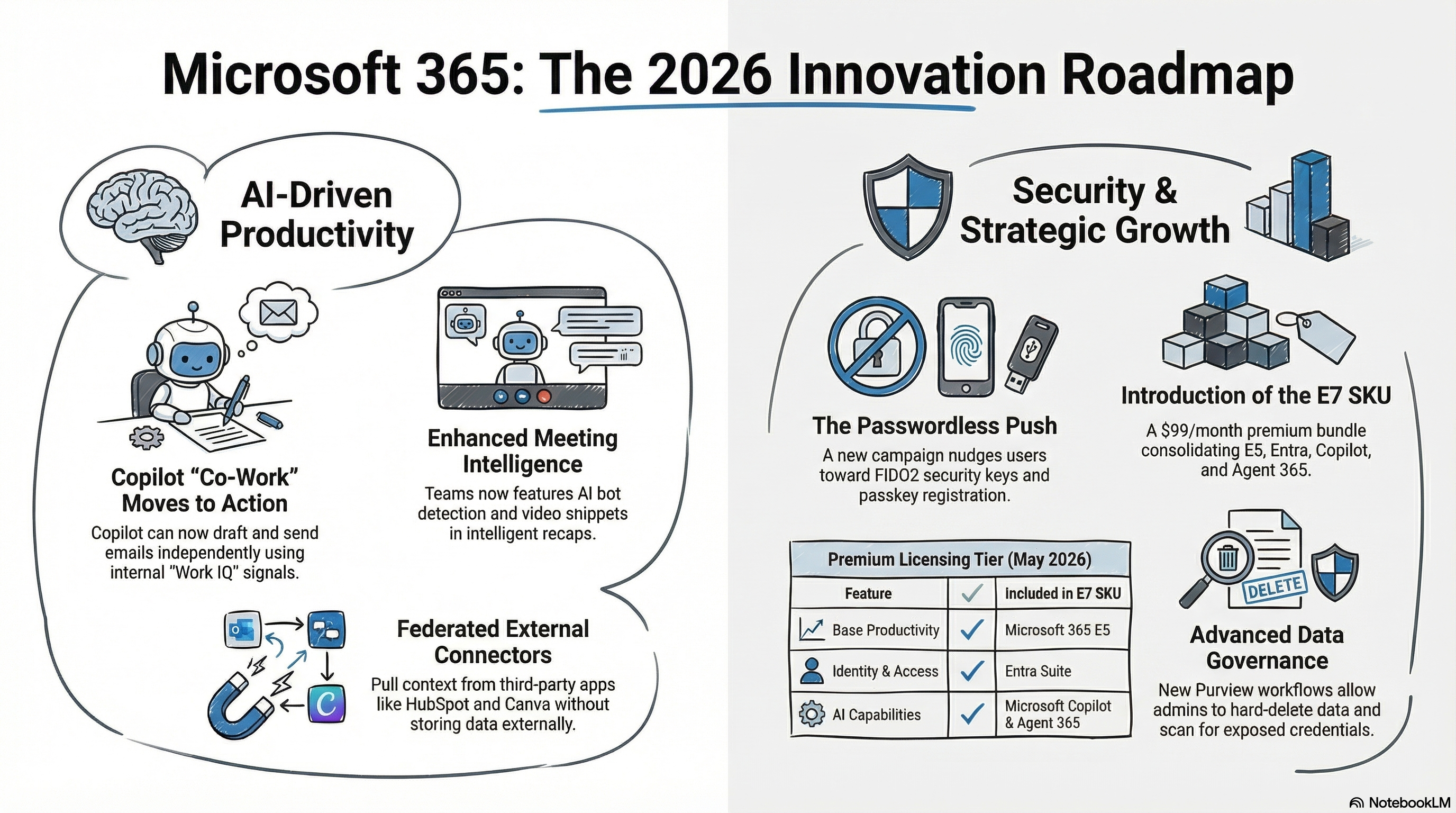
Microsoft Teams is receiving several updates aimed at improving meeting intelligence and mobile productivity. The intelligent recap feature is being enhanced with video snippets in the meeting highlights, though this functionality is only available for users with a Copilot add-on license. For mobile users, a new “catchup” feature is launching in May, allowing users to progressively view unread chats, meetings, and channel threads in one place.
Other notable Teams and Outlook updates include:
- AI Bot Detection: Teams will now detect third-party AI bots joining calls, allowing organisers to approve, deny, or remove them. Detection will be enabled by default starting in June.
- Expanded Phone Capabilities: Teams Phone users can now assign up to 10 phone numbers to a single account, allowing them to take calls from multiple numbers across devices without switching accounts.
- Mobile Meeting “Follow”: The “follow” meeting option is coming to Outlook mobile. This allows attendees to signal they cannot attend while ensuring they still receive the recording and key follow-up items.
Streamlining File Management in SharePoint and OneDrive
A major security transition is underway as Microsoft retires the one-time passcode (OTP) system for SharePoint and transitions to Microsoft Entra B2B. Starting in May, new external sharing invitations will require guests to be created as users within your tenant, a move designed to improve security despite potentially increasing the number of guest users managed.
Further updates to file management include:
- Markdown Support: Users can now view and edit markdown files directly within OneDrive and SharePoint, a feature increasingly popular for AI-related workflows.
- Granular Backup Restore: The Microsoft 365 Backup service now allows for the restoration of specific files and folders, moving away from the previous limitation of restoring entire sites.
- OneDrive Custom Naming: To help prevent path length errors in deeply nested structures, admins can now set custom names for OneDrive folders via Group Policy or Intune.
- Internal Link Expiration: Similar to “anyone” links, organisations can now set expiration dates for links shared with internal colleagues to maintain a least-privilege access model.
Identity and Security: The Move to Passkeys
Microsoft is pushing for a passwordless future by introducing a passkey registration campaign. This “nudge” process will encourage users to move from weaker MFA methods or the standard Microsoft Authenticator app toward FIDO2 security keys and passkeys.
Additional security and governance updates include:
- Entra Backup and Recovery: Now in preview for P1 or P2 licence holders, this feature allows for the restoration of core directory objects, including users, groups, and conditional access policies. It currently covers the last five days of activity.
- External MFA GA: Third-party MFA providers can now be integrated centrally into conditional access policies using OpenID Connect, replacing the legacy “custom controls” method.
- Intune Update Readiness: A new report is available in the Intune admin center for Auto Patch-eligible users to identify potential issues before the next upgrade cycle.
The Evolution of Microsoft Copilot
AI remains a central focus with the introduction of Copilot “co-work” in the Frontier early-access program. This moves beyond simple chatting to allow Copilot to take action on your behalf, such as drafting and sending emails based on “Work IQ” signals from your Teams and Outlook data.
Other AI enhancements include:
- Federated Connectors: Users can now pull context into Copilot from third-party apps like HubSpot and Canva without storing that external data within the Microsoft environment.
- Copilot Notebooks: New updates include a map view of workspace context and the ability to generate quizzes from your project materials.
- Model Options: Microsoft is becoming more open by making Anthropic's Claude Sonnet models available as an alternative option within the Copilot Frontier program.
Data Governance with Microsoft Purview
New Purview features focus on high-speed data management and AI risks:
- Priority Cleanup: A new workflow allows admins to bypass retention holds to hard-delete data in OneDrive and SharePoint when necessary.
- Security Posture Management (DSPM): E5 users gain better visibility into sensitive documents, including the ability to remove sharing links for sensitive files directly from the risk assessment portal.
- Credential Scanning: A new agent can help organisations discover exposed credentials hidden within files and folders across the tenant.
New Licensing: Introducing the E7 SKU
Microsoft has announced a new high-end licensing tier called E7, priced at USD $99 per user per month. Available since 1 May 2026, this bundle is designed as a comprehensive package that includes:
- Microsoft 365 E5
- Entra Suite
- Microsoft Copilot
- Agent 365
This SKU is intended to simplify licensing for large organisations looking to deploy the full suite of Microsoft's AI and advanced security capabilities.